AI Coding Assessment & Developer Evaluation Platform
Last updated: November 19, 2026
What is an AI coding assessment?
An AI coding assessment evaluates software engineers on real projects inside Visual Studio Code and Cursor IDE while collaborating with AI assistants like Cursor, Copilot, Claude Code, and Codex. SuperDriven AI captures consent-governed telemetry, prompt iterations, and git diffs, evaluating candidates across six objective criteria so engineering teams assess authentic technical judgment.
Reviewed by the SuperDriven AI recruiting automation team. ·
AI Developer Assessment & VS Code Extension Walkthrough
Platform Walkthrough & Feature Screens
Explore how recruiters configure real-world challenges, how candidates pair their local IDE, and how our evaluation engine performs evidence-backed forensic analysis.
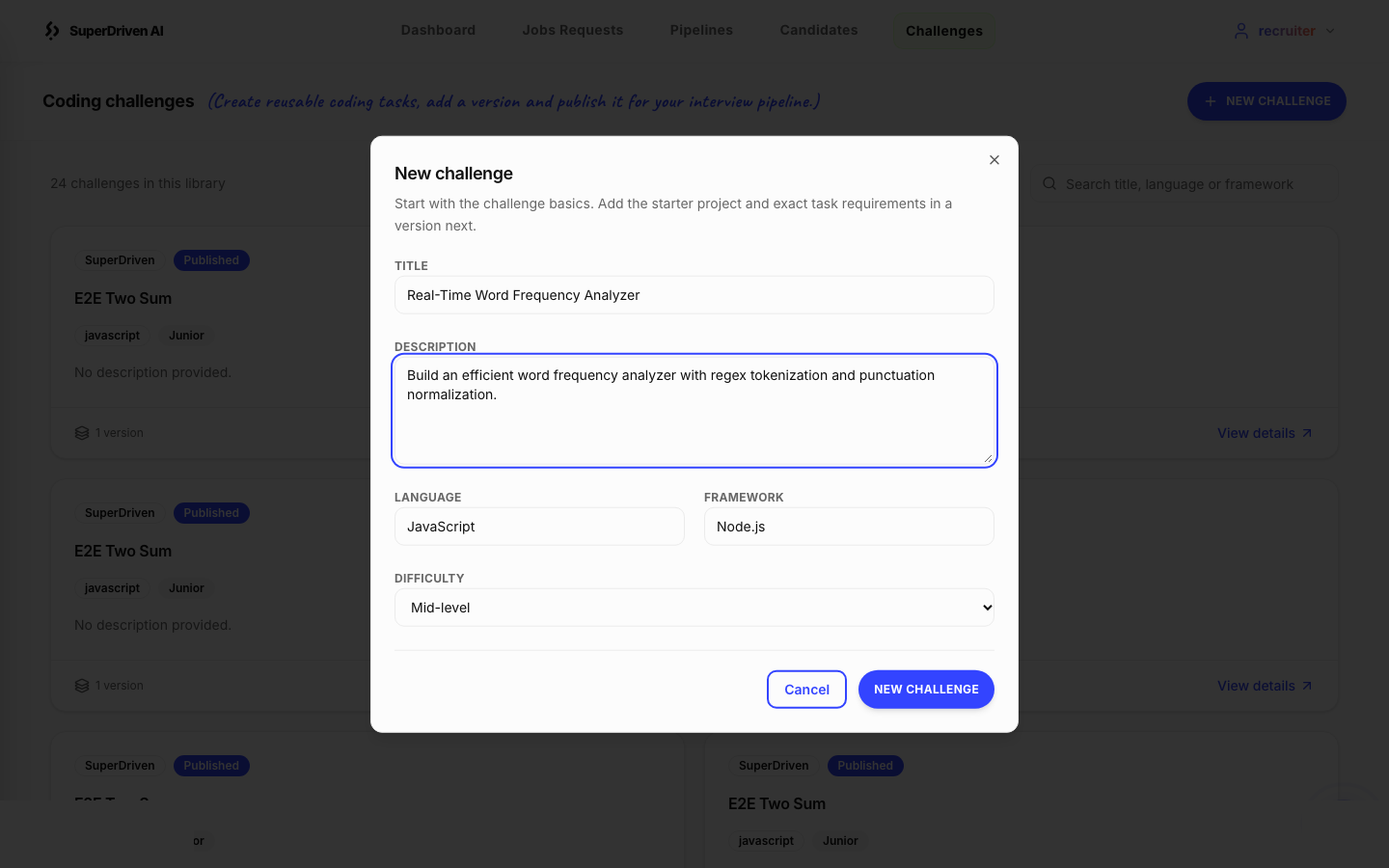
Recruiter Challenge Creation
Recruiters configure realistic multi-file coding challenges with custom language runtimes, frameworks, acceptance criteria, duration limits, and starter ZIP archives.
Why traditional coding tests fail in the era of AI
Traditional coding assessments were built for a pre-AI world. Candidates solve artificial algorithmic puzzles on toy in-browser scratchpads with copy-paste disabled and AI strictly prohibited. In reality, modern software engineers build complex multi-file systems using professional IDEs, automated test runners, and AI coding assistants like Cursor, GitHub Copilot, Claude Code, and OpenAI Codex.
Banning AI tools during technical assessments creates an artificial environment that penalizes high-performing engineers who excel at AI-assisted software delivery. Conversely, unmonitored take-home assignments fail because recruiters cannot distinguish whether a candidate deeply understands the architecture or simply pasted the prompt into ChatGPT without verification.
Engineering leaders need a modern evaluation standard: let candidates use their native Visual Studio Code or Cursor IDE setup and their chosen AI assistants, while transparently capturing their prompt engineering rigor, debugging patterns, verification discipline, and code evolution under explicit candidate consent.
How it works
Upload real-world starter projects with acceptance criteria
Recruiters create challenges by uploading starter ZIP archives containing multi-file application code, unit tests, and README instructions, configured with explicit task acceptance criteria.
Dispatch secure, single-use candidate invitations
Attach the assessment stage to your job pipeline. Candidates receive single-use invite links and verify access with 6-digit email one-time passcodes (OTP).
Pair assessment inside Visual Studio Code or Cursor IDE
Candidates generate a short-lived 6-digit pairing code and run the Pair Assessment command in the AI Developer Tracker extension, reviewing and confirming consent before recording starts.
Solve challenge with AI assistance or autonomous coding
Candidates write code, execute test suites, and interact with AI tools (Cursor AI, GitHub Copilot Chat, Claude Code, OpenAI Codex) or code manually. The extension records prompts, responses, tool calls, and git diffs.
Encrypted buffering & tamper-proof submission
An offline SQLite event queue protects telemetry during network drops with client-side AES-GCM encryption and HMAC integrity, flushing the final snapshot cleanly on submission.
Objective 6-criterion evaluation & forensic replay
Our evaluation engine filters structural noise, performs token-budgeted chunking, and evaluates candidates across six standardized criteria with step-by-step evidence citations and unified diffs.
Key benefits
Authentic IDE environment
Candidates work in their own configured Visual Studio Code or Cursor IDE environment with full terminal access, dependencies, and familiar keybindings.
Supported AI tools & native integrations
Transparently tracks Cursor AI, GitHub Copilot Chat, Claude Code, and OpenAI Codex sessions, as well as pure manual coding without AI.
Objective 6-criterion rubric evaluation
Standardized observation levels (Limited Observation, Demonstrated, Strong Observation) across Prompt Quality, Problem Solving, AI Critical Thinking, Debugging, Testing & Validation, and Code Quality.
Forensic prompt, diff & timeline replay
Hiring managers review the complete development process across Overview, AI Workflow, AI Interactions, unified Code Diffs, and chronological Timeline.
Cryptographic privacy & automated secret redaction
Telemetry is strictly scoped to the approved workspace folder, encrypted client-side via AES-GCM, and filtered to redact API keys, bearer tokens, passwords, and sensitive paths.
Multi-language & framework flexibility
Supports any programming language or framework (TypeScript, JavaScript, Python, Go, Java, Ruby) with real unit test execution and dependency managers.
Traditional coding tests vs SuperDriven AI coding assessment
| Hiring task | Traditional coding tests | SuperDriven AI coding assessment |
|---|---|---|
| Development environment | Restricted browser textarea with toy compiler | Local Visual Studio Code or Cursor IDE with full terminal & debugger |
| AI assistant policy | Banned or unmonitored copy-paste risks | Permitted & transparently tracked (Cursor, Copilot, Claude Code, Codex, or Manual) |
| Task authenticity | Synthetic LeetCode algorithmic puzzles | Real multi-file repositories with unit tests & README acceptance criteria |
| Evaluation standard | Binary pass/fail on hidden test cases | 6-criterion rubric: prompt quality, problem solving, critical thinking, debugging, testing, code quality |
| Reviewer audit trail | Static final code snapshot only | Forensic replay of prompt iterations, AI responses, tool calls, and unified git diffs |
Native Visual Studio Code and Cursor IDE assessment tracking
The AI Developer Tracker extension runs locally inside both Visual Studio Code and Cursor IDE. Rather than locking candidates into artificial browser editors, it transparently monitors file edits, character deltas, AST modifications, and test suite executions directly within the candidate's active development workspace.
An offline SQLite event journal ensures that unstable internet connections never drop recorded events. Sensitive code diffs and prompts are encrypted client-side using AES-GCM before transmission to the ingestion API.
Comprehensive telemetry for Cursor, Copilot, Claude Code, and Codex
Modern engineering evaluation requires seeing how developers prompt, verify, and guide AI output. Our extension intercepts and normalizes interactions from major AI assistants into structured prompt, response, and tool event records:
• Cursor IDE: Evaluates prompts and generations directly from the local workspace SQLite database without locking the database file.
• GitHub Copilot Chat: Discovers local chat session storage, extracting snapshot turns and streaming deltas into complete prompt-response records.
• Claude Code: Intercepts CLI hook events, recording candidate instructions, model responses, and tool call traces.
• OpenAI Codex: Tracks session transcripts and interaction checkpoints in native environments.
• Pure Manual Coding: Candidates who choose not to use AI are fully supported; the platform tracks manual keystrokes, git diffs, test runs, and autonomous problem decomposition without penalty.
Objective 6-criterion rubric evaluation engine (assessment-performance.v2)
When an assessment is submitted, our backend EvidencePreparer filters structural noise and organizes verified prompts, tool calls, tests, and diffs against task acceptance criteria. The data is partitioned through token-budgeted chunking (OpenAI: 28k tokens; Groq: 7.6k tokens) to produce high-precision, evidence-backed evaluations.
Candidates are evaluated across six core criteria: Prompt Quality (clarity, context, constraints), Problem Solving (observable task decomposition & approach), AI Critical Thinking (verification, correction, or rejection of AI suggestions), Debugging (evidence-backed diagnosis & troubleshooting), Testing & Validation (observed test creation, execution, and interpretation), and Code Quality (defensible local findings from permitted diffs).
Crucially, the evaluation assigns standardized observation levels (Limited Observation, Demonstrated, Strong Observation, or Insufficient Evidence) supported by specific stored event citations, rather than generating arbitrary numerical scores or automated pass/fail hiring decisions.
Recruiter forensic audit views and interactive unified diffs
Recruiters and hiring managers review assessment results through an interactive dashboard organized into five dedicated views: Overview, AI Workflow, AI Interactions, Code Changes (unified diffs), and chronological Timeline.
Every code change is paired with its corresponding prompt, AI response, and test execution. During final interview rounds, hiring managers can review the candidate's exact thinking process, ask why they chose a particular prompt phrasing, or discuss how they navigated a tricky debugging session, transforming technical interviews into collaborative code reviews.
Best use cases for AI coding assessments
- Assessing software engineers who code daily with AI assistants like Cursor, Copilot, and Claude Code
- Replacing LeetCode puzzles with real-world full-stack and backend engineering challenges
- Evaluating prompt engineering maturity and problem decomposition skills in developers
- Screening high volumes of engineering applicants with standardized objective rubrics
- Validating take-home projects without fear of unverified AI copy-pasting
- Benchmarking candidate debugging speed and automated test-writing rigor
- Conducting evidence-grounded final technical interview debriefs using forensic replay
What SuperDriven AI does not do
- SuperDriven AI does not make automated hiring or rejection decisions — it delivers evidence-grounded screening data so engineering teams make informed final decisions.
- Missing AI telemetry is not treated as a low skill score; candidates who choose to code manually without AI assistants are scored on problem solving, testing, and code quality.
- Telemetry tracking is strictly scoped to the approved assessment workspace directory and requires explicit candidate consent before any recording begins.
- Centralized privacy filters automatically redact API keys, bearer tokens, passwords, and sensitive paths before storage or review.
- Offline queueing guarantees event recovery on network drops, but candidate machines must maintain sufficient local disk space for SQLite journaling.
- Diff-only capture is partial; full repositories are not reconstructed on the client, and candidate files outside the approved workspace folder are strictly ignored.
Frequently asked questions
Explore more
Evaluate engineering talent with real-world AI coding assessments
Start assessing developers in their native IDE — no credit card required.
No credit card required · Cancel anytime